

2023 Realistic UiPath-ARDv1 Dumps Questions To Gain Brilliant Result
Start your UiPath-ARDv1 Exam Questions Preparation with Updated 340 Questions
UiPath is a leading RPA (Robotic Process Automation) software company that provides automation solutions to businesses worldwide. UiPath offers a range of products and services that help organizations automate their workflows, improve efficiency, and reduce costs. UiPath also provides certification programs for individuals who want to become proficient in RPA technology.
NEW QUESTION # 155
A developer wants to use a Write Cell and Read Range activities to work with an Excel file. The Excel file is protected for any modifications by a password, so unauthorized users can only read dat a. What should be done in order to ensure that the robot is able to write and read data from this file?
- A. Password to this file should be provided in the "Edit Password" property of the Excel Application Scope activity. Password should be provided in a SecureString format.
- B. Password to this file should be provided in the "Edit Password" property of the Excel Application Scope activity. Password should be provided in a String format.
- C. Password to this file should be provided in the "Password" property of the Excel Application Scope activity. Password should be provided in a String format.
- D. Password to this file should be provided in the "Edit Password" property and "Password" property of the Excel Application Scope activity. Password should be provided in a String format.
Answer: B
Explanation:
Edit password property stores the password required for editing password-protected Excel workbooks, if necessary. Only String variables and strings are supported.
While the Password property stores the password required for opening and reading password-protected Excel workbooks, if necessary. Only String variables and strings are supported.
In this case, the file is only password-protected for editing, so unauthorized users can read the file, but not write any data. That means that the password for opening and reading is not required, only for editing. For that reason, only the Edit Password property should be filled in.
NEW QUESTION # 156
In the UiPath Robotic Enterprise Framework template, if a System Error is encountered in the Init state of the Main workflow, which state is executed next?
Options are :
- A. End Process
- B. Init
- C. Get Transaction Data
Answer: A
NEW QUESTION # 157
A developer wants to determine how much time it takes for an activity to perform.
Based on the exhibit, what should the developer use to know how much time has elapsed in executing the Timed Activity sequence?
- A. StartTime = DateTime.Now.ToString("HH:mm:ss")
EllapsedTime = DateTime.Now - StartTime - B. StartTime = DateTime.Now
ElapsedTime = ((DateTime.Now - StartTime).TotalSeconds).ToString - C. StartTime = DateTime.Now
ElapsedTime = DateTime.Now.ToString("HH:mm:ss") - StartTime.ToString - D. StartTime = DateTime.Now
EllapsedTime = (DateTime.Now.Second - StartTime.Second).ToString
Answer: B
NEW QUESTION # 158
You are developing a .xaml file to interact with multiple fields of a web page. You want to Auto Empty the fields that require input.
Which input method(s) will automatically empty the target input fields?
- A. "Default" and "SimulateType"
- B. "SimulateType" only
- C. "SendWindowMessages" only
- D. "SimulateType" and "SendWindowMessages"
Answer: D
NEW QUESTION # 159
If a large item collection is processed using For Each, which activity enables you to efficiently exit the loop after a specific moment?
Options are :
- A. No activity can be used. Instead, you have to create a Boolean variable based on which the For Each loop is broken
- B. A While loop should be used instead of For Each
- C. The "Break" activity is the most suitable in For Each
Answer: C
NEW QUESTION # 160
A developer has configured the Activity Project Settings for UI automation and a Click activity as shown below. The required selector does not exist. What Timeout value will be used by the robot once executed in Run Mode?
Please find the properties of the Click activity below.
- A. 0 seconds
- B. 90 seconds
- C. 60 seconds
- D. 30 seconds
Answer: D
Explanation:
Settings changed in Project Settings take effect if the corresponding property is left blank in the activity. If in the same project an activity has the Timeout property manually set (even if the value 30000 milliseconds is the same as the default one), then the value set in the property panel overwrites any other value configured in the Activity Project Settings window.
UiPath Documentation
Exam Topic: Describe how to use and configure Activity Project Settings and Libraries
NEW QUESTION # 161
Which emails are deleted if you use Get IMAP Mail Messages with the DeleteMessages property set to true?
Options are :
- A. There is no DeleteMessages property for the Get IMAP Mail Message activity. This option is available only for Get Exchange Mail Message.
- B. Only the emails that were marked as previously read.
- C. The ones in the list that is retrieved by the Get IMAP Mail Messages activity.
Answer: C
NEW QUESTION # 162
During the debugging process, which panel will help monitor the variables' values, arguments, and user-defined expressions within the scope of the executing activity?
- A. Locals Panel
- B. Immediate Panel
- C. Watch Panel
- D. Call Stack Panel
Answer: C
NEW QUESTION # 163
How can you dynamically change parts of a selector?
Options are :
- A. By adding parameters from the Properties tab.
- B. By using variables to replace the dynamic parts
- C. You cannot have dynamic components in a selector.
Answer: B
NEW QUESTION # 164
A developer uses Read Range and Write Range activities to copy data from one worksheet to another. What will be the value of "A1" cell in "Sheet2" worksheet when the following sequence is executed?
Please find below the properties of the Read Range activity
Please find below the properties of the Write Range activity
Please find below the data in "Sheet1"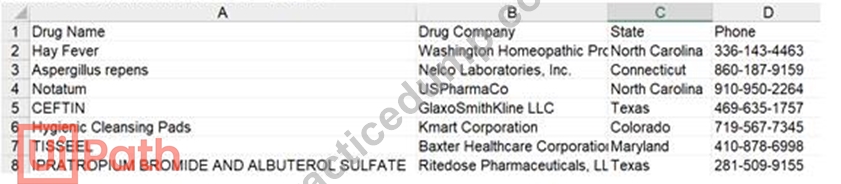
- A. Hay Fever
- B. Column1
- C. Drug Name
- D. Column0
Answer: A
Explanation:
In the Read Range activity, when AddHeaders is selected, the column headers from the specified spreadsheet range are also extracted and set as the column names for the output datatable.
In the Write Range activity, when AddHeaders is selected, column headers are also written to the specified range. Otherwise, everything starting from the first row of the datatable is written to the worksheet (headers are not written).
In this case, robot first sets Drug Name, Drug Company, State and Phone as column names for the output datatable, however doesn't write them in Sheet2, as AddHeaders is not selected in the Write Range activity.
UiPath Documentation Read Range
UiPath Documentation Write Range
Exam Topic: Identify and describe how activities are used to automate actions in Excel, e-mail, and .pdfs
NEW QUESTION # 165
From the lowest priority to the highest priority, what is the correct priority sequence of the Log Levels for UiPath Robots?
NOTE: Drag and drop the lowest priority level to the top of the list and repeat until the highest priority level appears at the bottom of the list.
Answer:
Explanation:
NEW QUESTION # 166
A developer created an attended process which used UI Automation activities on hidden or minimized windows. While the process is running on the user's machine, the user also needs the ability to use the machine.
Which activity is configured by default to enable interaction with hidden or minimized windows?
- A. Type Secure Text
- B. Set Text
- C. Click
- D. Hover
Answer: B
NEW QUESTION # 167
Where in the Robotic Enterprise (RE) Framework template project is the SetTransactionStatus.xaml invoked?
- A. In the Finally section of the Try Catch activity in the Process Transaction state.
- B. In the Try section of the Try Catch activity in the End Process state.
- C. In the Try section of the Try Catch activity in the Process Transaction state.
- D. In the Finally section of the Try Catch activity in the End Process state.
Answer: C
NEW QUESTION # 168
A developer created a sequence with a Retry Scope shown in the following exhibit:
What is the content of the Output panel after running this sequence?
- A. 0
- B. 1
2
3 - C. 1
2
3 - D. 1
Answer: A
Explanation:
Retry Scope: End
NEW QUESTION # 169
In a Try Catch activity, how many times is the Finally section executed if no error occurs in the Try section?
Options are :
- A. The Finally section is executed only when the Catch section is executed.
- B. Zero
- C. Once
Answer: C
NEW QUESTION # 170
What represents an example of tags and attributes identified by a partial selector?
- A. <html app='chrome.exe' title-ACME System 1 - Log In' />
<webctrl tag='INPUT' type='email' /> - B. <wnd app='applicationframehost.exe' title='Calculator' />
<uia automationid='NumberPad' cls='NamedContainerAutomationPeer' name='Number pad' /> - C. <wnd cls='ToolbarWindow32' />
<ctrl name='Delay' role='split button' /> - D. <wnd app='powerpnt.exe' cls='PPTFrameClass' title='Presentation2 - PowerPoint' />
<uia name='Title TextBox' role='textbox' />
Answer: B
Explanation:
<uia automationid='num8Button' cls='Button' name='Eight' />
NEW QUESTION # 171
......
Easy Success UiPath UiPath-ARDv1 Exam in First Try: https://www.practicedump.com/UiPath-ARDv1_actualtests.html
A Fully Updated UiPath-ARDv1 Exam Dumps - PDF Questions and Testing Engine: https://drive.google.com/open?id=1OdFIXT0O9Ck-ED8W5pxkA7lI0vaHLdsO