

Latest Fortinet NSE4_FGT_AD-7.6 Free Certification Exam Material with 96 Q&As
UPDATED NSE4_FGT_AD-7.6 Exam Questions Certification Test Engine to PDF
NEW QUESTION # 51
FortiGate is integrated with FortiAnalyzer and FortiManager.
When creating a firewall policy, which attribute must an administrator include to enhance functionality and enable log recording on FortiAnalyzer and FortiManager?
- A. Policy ID
- B. Universally Unique Identifier
- C. Sequence ID
- D. Log ID
Answer: B
Explanation:
In FortiOS 7.6, when FortiGate is integrated with FortiAnalyzer and FortiManager, firewall policies rely on a Universally Unique Identifier (UUID) to ensure proper policy tracking, synchronization, and log correlation across devices.
Why the UUID is required
Every firewall policy in FortiOS has a UUID.
FortiManager uses the UUID to:
Track policies across managed FortiGate devices
Maintain policy consistency during installs and revisions
FortiAnalyzer uses the UUID to:
Correlate logs accurately to the correct firewall policy
Preserve log association even if policy order or policy ID changes
Without a UUID:
Policy-to-log mapping can break
FortiManager cannot reliably manage or synchronize policies
FortiAnalyzer log analysis becomes inconsistent
This is explicitly documented in Fortinet administration and logging architecture references.
Why the other options are incorrect
B . Policy ID
Policy ID can change when policies are moved and is not reliable for long-term correlation across FortiManager and FortiAnalyzer.
C . Sequence ID
Sequence ID reflects GUI ordering only and has no role in log correlation.
D . Log ID
Log ID is generated per log event, not per firewall policy.
NEW QUESTION # 52
Refer to the exhibit.
A RADIUS server configuration is shown.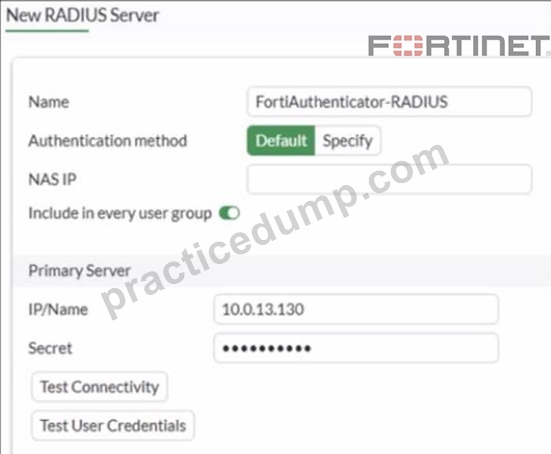
An administrator added a configuration for a new RADIUS server While configuring, the administrator enabled Include in every user group What is the impact of enabling Include in every user group in a RADIUS configuration?
- A. This option places the RADIUS server, and all users who can authenticate against that server, into every RADIUS group.
- B. This option places the RADIUS server, and all users who can authenticate against that server, into every FortiGate user group.
- C. This option places all users into every RADIUS user group, including groups that are used for the LDAP server on FortiGate.
- D. This option places all FortiGate users and groups required to authenticate into the RADIUS server, which, in this case, is FortiAuthenticator.
Answer: B
Explanation:
Based on the FortiOS 7.6 Authentication and User Group documentation, the correct answer is A.
Meaning of "Include in every user group" (FortiOS 7.6)
When configuring a RADIUS server on FortiGate, enabling Include in every user group has a very specific and documented effect:
The configured RADIUS server object is automatically added to all FortiGate user groups.
As a result, any user who successfully authenticates against that RADIUS server becomes a valid member of every FortiGate user group, unless additional group filtering (such as RADIUS attributes) is applied.
This simplifies configuration when the same external authentication source must be accepted across multiple firewall policies that reference different user groups.
This behavior is explicitly described in the FortiOS 7.6 Administrator Guide under RADIUS authentication servers and user groups.
Why Option A is Correct
FortiGate user groups can include:
Local users
LDAP servers
RADIUS servers
Enabling Include in every user group causes FortiGate to:
Insert the RADIUS server into all existing and future FortiGate user groups Therefore, all users authenticating via this RADIUS server are implicitly allowed in every FortiGate user group.
This is exactly what option A describes.
Why the Other Options Are Incorrect
B: FortiGate does not push users or groups into the RADIUS server. Authentication is always initiated by FortiGate toward RADIUS.
C: FortiGate does not manage or modify RADIUS-side group definitions.
D: LDAP and RADIUS user groups are separate authentication mechanisms; this setting does not merge or affect LDAP groups.
NEW QUESTION # 53
An administrator wanted to configure an IPS sensor to block traffic that triggers the signature set number of times during a specific time period. How can the administrator achieve the objective?
- A. Use IPS signatures, rate-mode periodical option.
- B. Use IPS group signatures, set rate-mode 60.
- C. Use IPS filter, rate-mode periodical option.
- D. Use IPS packet logging option with periodical filter option.
Answer: A
Explanation:
" Rate-based IPS signatures also allows you to detect anomalies, which are unusual behaviors in the network..."
"There are two ways to add predefined signatures to an IPS sensor. One way is to select the signatures individually... The second way to add a signature to a sensor is using filters."
" You can also add rate-based signatures to block specific traffic when the threshold is exceeded. On the CLI, If you set the command rate-mode to periodical, FortiGate triggers the action when the threshold is reached during the configured Duration time period. " Technical Deep Dive:
The correct answer is C. Use IPS signatures, rate-mode periodical option.
The guide is explicit that this behavior belongs to rate-based IPS signatures . The question asks for blocking traffic when a signature is triggered a certain number of times within a defined interval. That is exactly what rate-mode periodical does: it evaluates the trigger count over the configured duration window and then applies the configured IPS action when the threshold is met.
Why the other options are wrong:
* A is wrong because rate-mode 60 is not the documented syntax or method.
* B is wrong because packet logging records packets; it does not implement threshold-based blocking logic.
* D is wrong because the guide ties rate-mode periodical to rate-based signatures , not to IPS filters as the mechanism for this threshold behavior.
Operationally, this is used for anomaly-style detection, similar in concept to lightweight rate-based protection.
A typical CLI pattern is along these lines:
config ips sensor
edit " custom-ips "
config entries
edit 1
set rule < signature_id >
set rate-mode periodical
set rate-count < threshold >
set rate-duration < seconds >
set action block
next
end
next
end
This works best when applied only to relevant protocols and signatures, because broad use of rate-based signatures can consume more resources and increase false-positive risk.
NEW QUESTION # 54
Refer to the exhibits.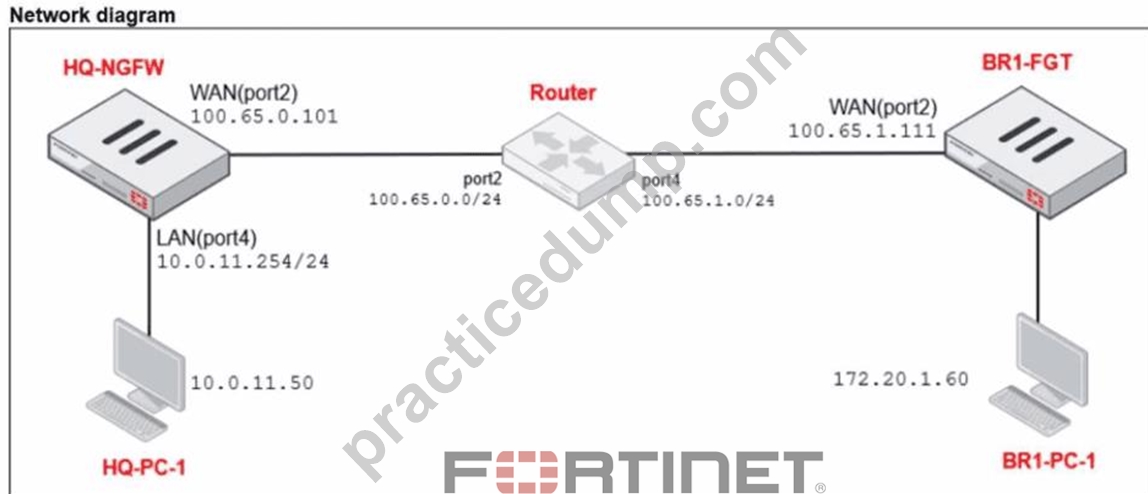
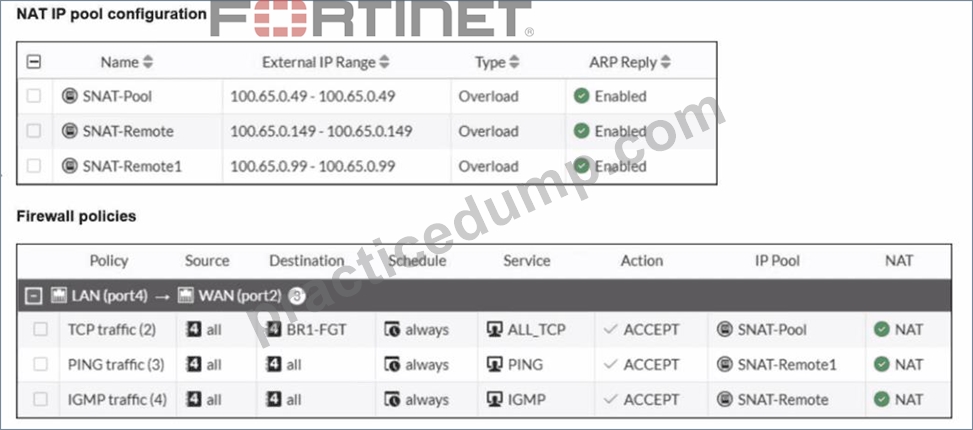
The exhibits show a diagram of a FortiGate device connected to the network, as well as the IP pool configuration and firewall policy objects.
The WAN (port2) interface has the IP address
100.65.0.101/24.
The LAN (port4) interface has the IP address
10.0.11.254/24.
Which IP address will be used to source NAT (SNAT) the traffic, if the user on HQ-PC-1 (10.0.11.50) pings the IP address of BR-FGT (100.65.1.111)?
- A. 100.65.0.49
- B. 100.65.0.99
- C. 100.65.0.101
- D. 100.65.0.149
Answer: B
Explanation:
From the exhibits, there are three relevant firewall policies from LAN (port4) to WAN (port2), each using a different IP pool for source NAT:
TCP traffic
Service: ALL_TCP
Destination: BR1-FGT
IP Pool: SNAT-Pool → 100.65.0.49
PING traffic
Service: PING
Destination: all
IP Pool: SNAT-Remote1 → 100.65.0.99
IGMP traffic
Service: IGMP
Destination: all
IP Pool: SNAT-Remote → 100.65.0.149
The user on HQ-PC-1 (10.0.11.50) is pinging BR1-FGT (100.65.1.111). In FortiOS, policy matching is based on (among other fields) source, destination, and service, and the first matching policy in top-down order is applied.
Because the traffic is ICMP echo (ping), it matches the policy named PING traffic (service PING, destination all). That policy explicitly uses Use Dynamic IP Pool with SNAT-Remote1, which is configured with external IP 100.65.0.99.
Therefore, the source NAT IP used for this ping is 100.65.0.99.
NEW QUESTION # 55
Refer to the exhibit.
Which two ways can you view the log messages shown in the exhibit? (Choose two.)
- A. In the Forward Traffic section
- B. By right clicking the implicit deny policy
- C. Using the FortiGate CLI command diagnose log test
- D. By filtering by policy universally unique identifier (UUID) and application name in the log entry
Answer: A,D
Explanation:
The exhibit shows a FortiGate UTM application control log with fields such as:
type="utm"
subtype="app-ctrl"
action="block"
policyid=1
appid=30220
appcat="Video/Audio"
service="HTTP"
apprisk="elevated"
This is a forward traffic security log, generated by Application Control applied to a firewall policy.
Why the correct answers are C and D
C . By filtering by policy universally unique identifier (UUID) and application name in the log entry Correct.
FortiOS logs can be viewed and filtered in:
Log & Report → Forward Traffic
Administrators can filter logs using fields such as:
Policy ID / Policy UUID
Application name (app)
Application ID (appid)
The log entry clearly includes application-related fields, making filtering by policy and application a valid and documented way to view these logs.
D . In the Forward Traffic section
Correct.
The log is a UTM Application Control log for traffic passing through a firewall policy.
Such logs are displayed under:
Log & Report → Forward Traffic
This is the standard and correct location to view application control, web filter, IPS, and other security profile logs related to user traffic.
Why the other options are incorrect
A . By right clicking the implicit deny policy
Incorrect.
Implicit deny policies do not generate UTM forward traffic logs like the one shown.
Application control logs are generated only by explicit firewall policies with security profiles enabled.
B . Using the FortiGate CLI command diagnose log test
Incorrect.
diagnose log test is used to test log connectivity and log settings, not to view historical log entries.
It does not display traffic or UTM logs.
NEW QUESTION # 56
Refer to the exhibits.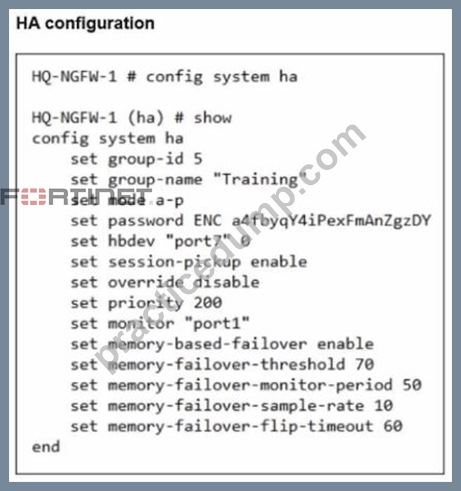
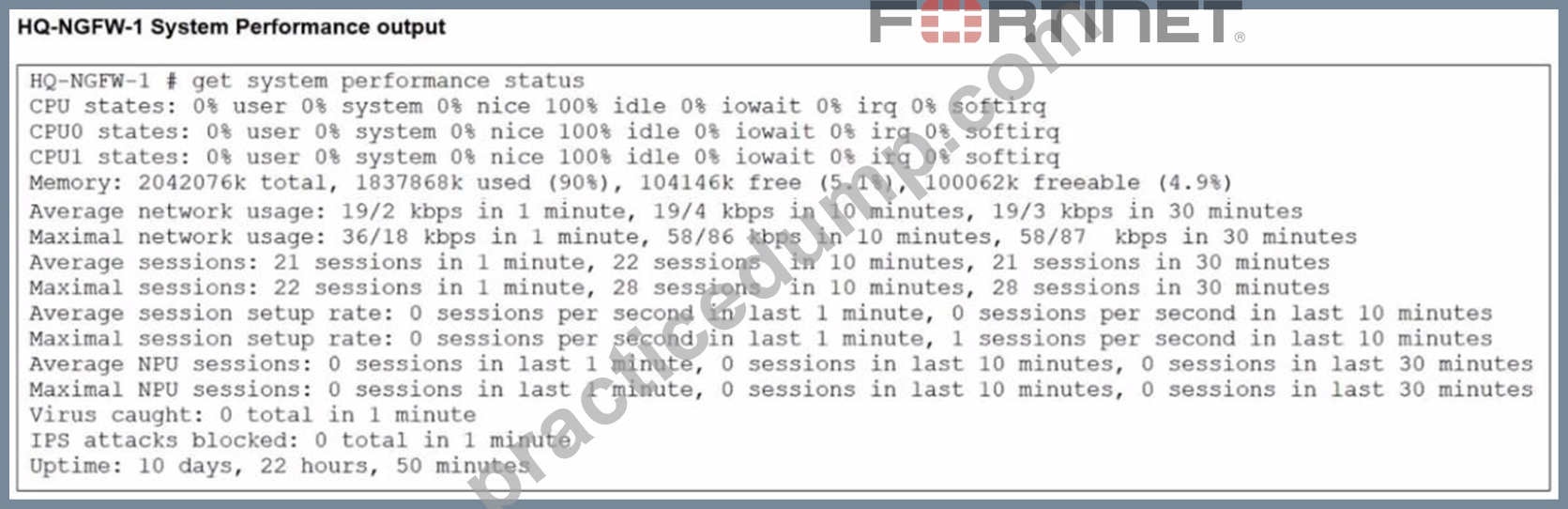
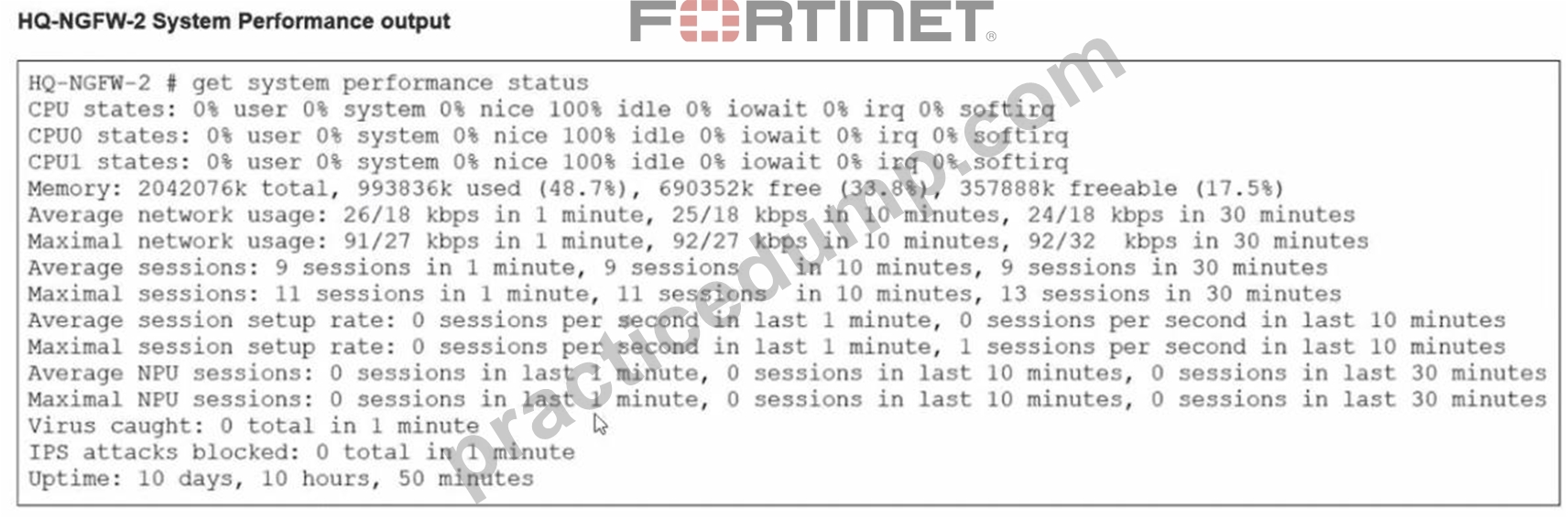
An administrator has observed the performance status outputs on an HA cluster for 55 seconds.
Which FortiGate is the primary?
- A. HQ-NGFW-1 with the parameter memory-failover-flip-timeout setting
- B. HQ-NGFW-2 with the parameter priority setting
- C. HQ-NGFW-1 with the parameter override setting
- D. HQ-NGFW-2 with the parameter memory-failover-threshold setting
Answer: D
Explanation:
From the HA configuration shown for HQ-NGFW-1:
set memory-based-failover enable
set memory-failover-threshold 70
set memory-failover-monitor-period 50
set memory-failover-sample-rate 10
set memory-failover-flip-timeout 60
set override disable
set priority 200
From the performance status outputs:
HQ-NGFW-1 memory used is 90% (well above the configured threshold of 70%) HQ-NGFW-2 memory used is about 48.7% (well below the threshold) What happens in FortiOS 7.6 with memory-based failover When memory-based failover is enabled, FortiGate monitors memory utilization. If the unit's memory usage stays above the configured memory-failover-threshold for the configured memory-failover-monitor-period, the cluster triggers a failover away from the unit under memory pressure.
Threshold = 70%
HQ-NGFW-1 is at 90%, so it violates the threshold.
Monitor period = 50 seconds.
The administrator observed for 55 seconds, which is longer than 50 seconds, so the condition is met for long enough to trigger failover.
The memory-failover-flip-timeout 60 is used to prevent rapid back-and-forth role changes (flapping) after a failover decision; it does not prevent the initial failover from occurring once the threshold breach persists for the monitor period.
NEW QUESTION # 57
FortiGate is operating in NAT mode and has two physical interfaces connected to the LAN and DMZ networks respectively. Which two statements about the requirements of connected physical interfaces on FortiGate are true? (Choose two.)
- A. Both interfaces must have DHCP enabled and interfaces set to LAN and DMZ roles assigned.
- B. Both interfaces must have directly connected routes on the routing table.
- C. Both interfaces must have IP addresses assigned.
- D. Both interfaces must have the interface role assigned.
Answer: B,C
Explanation:
In FortiOS 7.6, when a FortiGate is operating in NAT mode, physical interfaces that participate in traffic forwarding (such as LAN and DMZ) must meet certain fundamental requirements.
Correct statements
D . Both interfaces must have IP addresses assigned.
Correct
In NAT mode, FortiGate operates as a Layer-3 device.
Every interface that forwards traffic must have an IP address.
Without an IP address:
The interface cannot participate in routing
Firewall policies cannot be applied correctly
This is a mandatory requirement.
C . Both interfaces must have directly connected routes on the routing table.
Correct
When an IP address is assigned to an interface, FortiGate automatically installs a connected route for that subnet in the routing table.
These connected routes are required so FortiGate:
Knows how to reach the locally attached networks
Can forward traffic between LAN and DMZ
While administrators do not manually create these routes, their presence is required for correct operation.
Why the other options are incorrect
A . Both interfaces must have DHCP enabled and roles assigned.
Incorrect
DHCP is optional; interfaces can use static IPs.
Interface roles (LAN, DMZ, WAN) are administrative/GUI aids, not functional requirements.
B . Both interfaces must have the interface role assigned.
Incorrect
Interface roles affect GUI grouping and some default behavior.
They are not required for NAT mode operation or traffic forwarding.
NEW QUESTION # 58
Refer to the exhibit. The NOC team connects to the FortiGate GUI with the NOC_Access admin profile. They request that their GUI sessions do not disconnect too early during inactivity. What must the administrator configure to answer this specific request from the NOC team?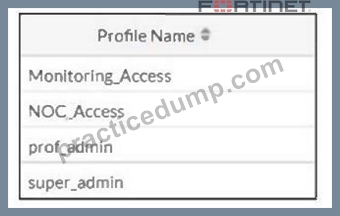
- A. Increase the admintimeout value under config system accprofile NOC_Access.
- B. Increase the offline value of the Override Idle Timeout parameter in the NOC_Access admin profile.
- C. Move NOC_Access to the top of the list to ensure all profile settings take effect.
- D. Ensure that all NOC_Access users are assigned the super_admin role to guarantee access
Answer: B
Explanation:
You can override the idle timeout setting per administartor profile using the Override Idle Timeout setting.
You can configure an administrator profile to increase inactivity timeout and facilitate use of the GUI for central monitoring. Then Override Idel Timeout setting allows the admintimeout value, under the config system accprofile, to be overridden per access profile..
NEW QUESTION # 59
Refer to the exhibits.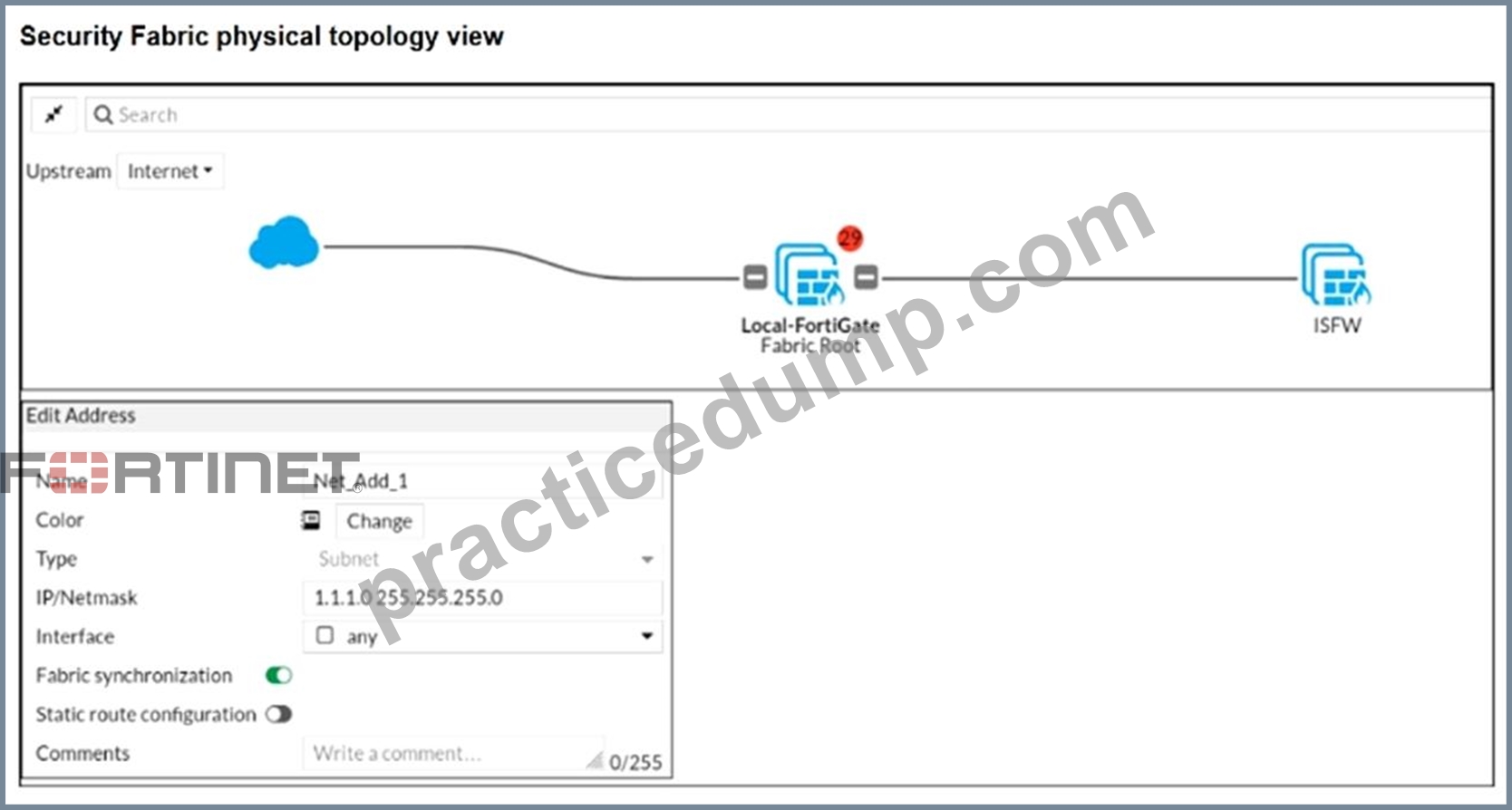
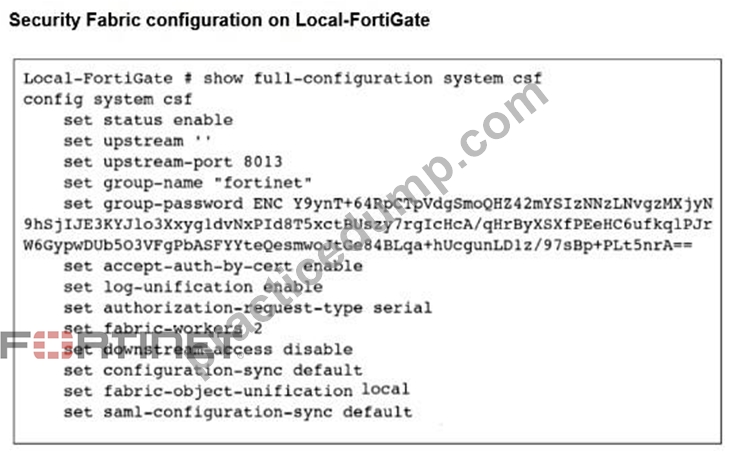
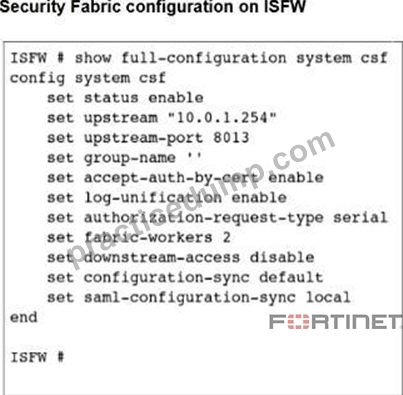
An administrator creates a new address object on the root FortiGate (Local-FortiGate) in the security fabric. After synchronization, this object is not available on the downstream FortiGate (ISFW).
What must the administrator do to synchronize the address object?
- A. Change the csfsetting on ISFW (downstream) to set configuration-sync local.
- B. Change the csfsetting on Local-FortiGate (root) to set fabric object-unification default.
- C. Change the csfsetting on both devices to set downstream-access enable.
- D. Change the csfsetting on ISFW (downstream) to set authorization-request-type certificate.
Answer: B
Explanation:
The CLI command fabric-object-unification is available only on the root FortiGate device. When set to local, global objects are not synchronized to downstream devices in the Security Fabric.
The default value is default.
NEW QUESTION # 60
Refer to the exhibits, which show the firewall policy and an antivirus profile configuration.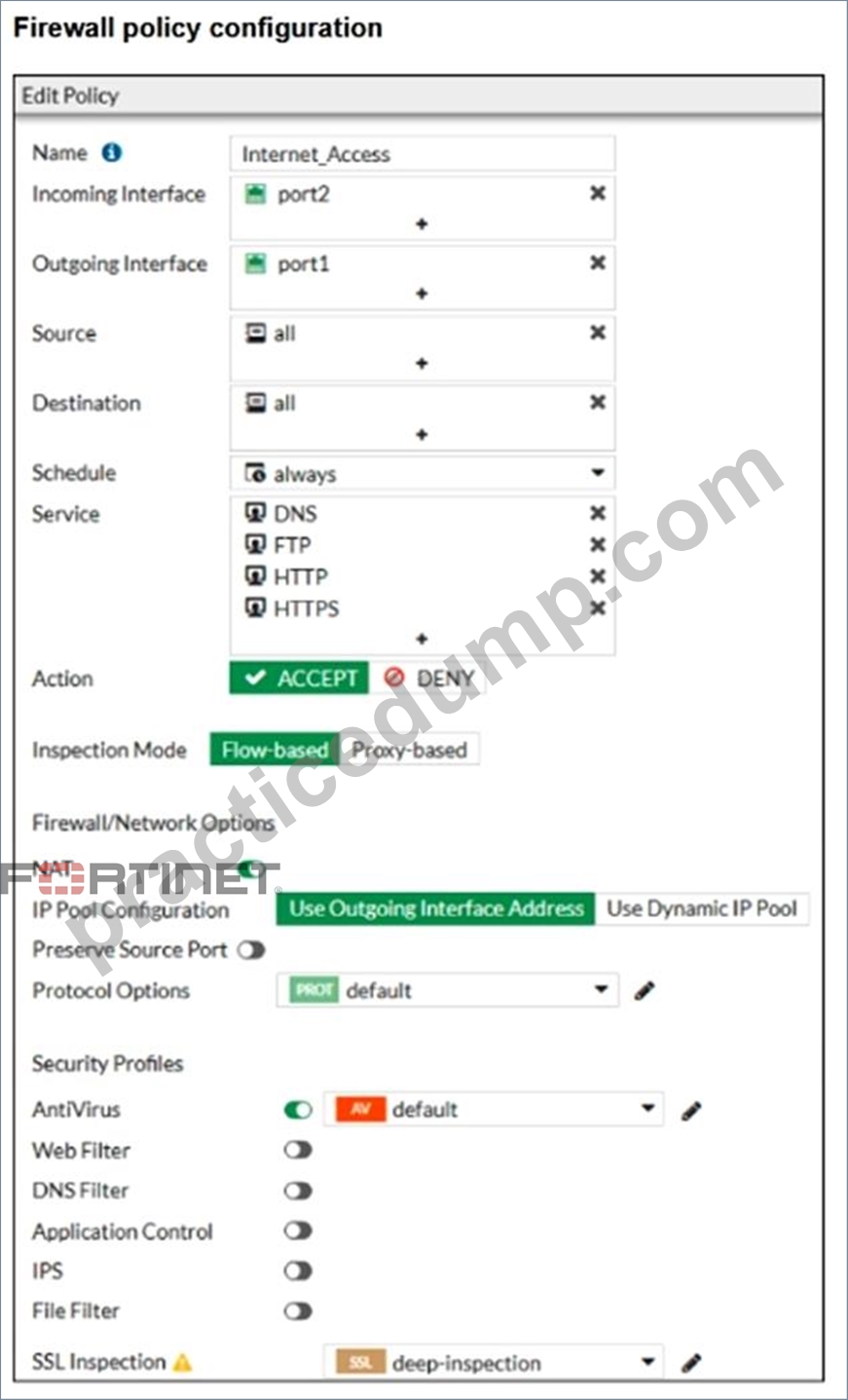
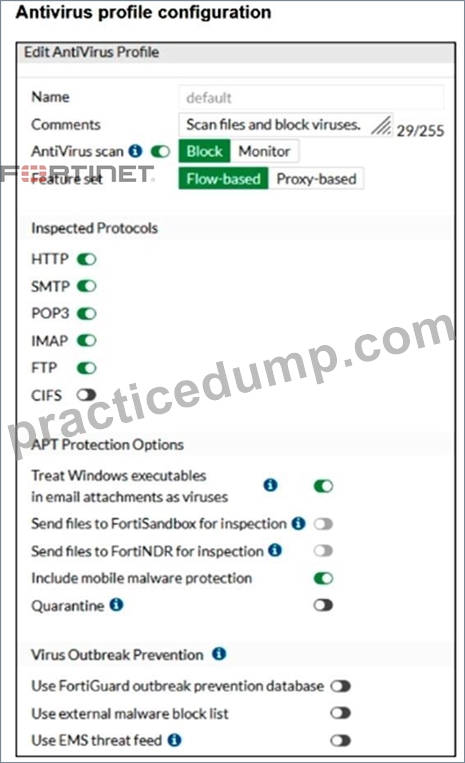
Why is the user unable to receive a block replacement message when downloading an infected file for the first time?
- A. Flow-based inspection is used, which resets the last packet to the user.
- B. The firewall policy performs a full content inspection on the file.
- C. The intrusion prevention security profile must be enabled when using flow-based inspection mode.
- D. The option to send files to FortiSandbox for inspection is enabled.
Answer: A
Explanation:
In Flow Based scanning, if a virus is detected, the final packet is dropped making the file unusable tot the end user. FG caches the URL of the file. If the user attempts to download again, rather than scanning the file again, the IPS engine then sends a block message to the user.
NEW QUESTION # 61
An administrator has configured a dialup IPsec VPN on FortiGate with add-route enabled. However, the static route is not showing in the routing table. Which two statements about this scenario are correct? (Choose two.)
- A. The administrator must ensure phase 2 is successfully established
- B. The administrator must enable a dynamic routing protocol on the dialup interface.
- C. The administrator must define the remote network correctly in the phase 2 selectors.
- D. The administrator must use a policy route instead of a static route for add-route to work properly.
Answer: A,C
Explanation:
With a dialup IPsec VPN on FortiGate, when add-route is enabled, FortiGate will only install the corresponding route when it has enough negotiated information from the tunnel. In FortiOS 7.6, that means the route is tied to the Phase 2 (Quick Mode) selectors and is created dynamically when the IPsec SA is actually up.
B). The administrator must ensure phase 2 is successfully established
This is required. FortiGate does not install the add-route route just because Phase 1 exists or because the configuration is present. The route is added when the tunnel is effectively usable, which requires Phase 2 (IPsec SA) to be up. If Phase 2 is not established, there is no active SA and FortiGate will not inject the related route into the routing table.
So, if the static route is not showing, one correct explanation is that Phase 2 is not up.
C). The administrator must define the remote network correctly in the phase 2 selectors This is also required. For dialup tunnels, FortiGate derives what route to add from the remote subnet(s) defined in the Phase 2 selector (proxy ID). If the remote network in Phase 2 is missing, incorrect, or too broad
/too narrow in a way that prevents negotiation, the tunnel either won't come up (so no route), or the route that would be installed won't match what the administrator expects.
So, another correct explanation is that the Phase 2 remote network is not correctly defined, preventing the correct route from being created.
Why the other options are incorrect
A). Policy route instead of a static route
Add-route does not require policy routes. It is specifically a feature that injects a route (route-table entry) associated with the IPsec tunnel/SA and the Phase 2 selector networks.
D). Enable a dynamic routing protocol
Dynamic routing protocols (OSPF/BGP/RIP) are not required for add-route. Add-route is independent of dynamic routing and works by installing routes locally based on the negotiated selectors.
NEW QUESTION # 62
When FortiGate performs SSL/SSH full inspection, you can decide how it should react when it detects an invalid certificate.
Which three actions are valid actions that FortiGate can perform when it detects an invalid certificate? (Choose three.)
- A. Block
- B. Block & Warning
- C. Allow
- D. Trust & Allow
- E. Allow & Warning
Answer: A,C,D
Explanation:
When a certificate fails for any of the reasons above, you can configure any of the following actions:
* Keep Untrusted & Allow: FortiGate allows the website and lets the browser decide the action to take.
FortiGate takes the certificate as untrusted.
* Block: FortiGate blocks the content of the site.
* Trust & Allow: FortiGate allows the website and takes the certificate as trusted.
NEW QUESTION # 63
Refer to the exhibit, which shows an SD-WAN zone configuration on the FortiGate GUI.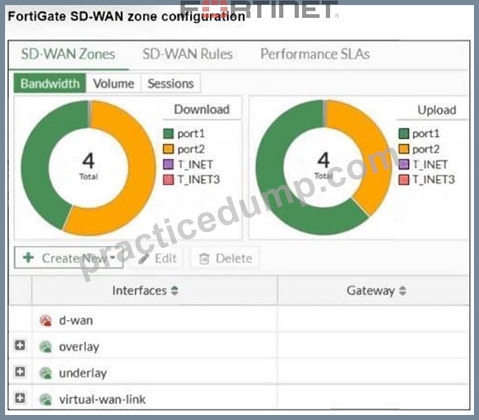
Based on the exhibit, which statement is true?
- A. The virtual-wan-link zone contains no member.
- B. The d-wan zone cannot be deleted.
- C. The underlay zone contains port1 and port2.
- D. The d-wan zone contains no member.
Answer: D
Explanation:
The "d-wan" zone in FortiGate SD-WAN configuration is the default SD-WAN zone created when SD- WAN is enabled. This zone contains all the interfaces assigned to SD-WAN and is essential for the functionality of the SD-WAN feature. The "d-wan" zone cannot be deleted because it is required for SD-WAN operations. Option A is incorrect because the underlay zone does not contain port1.
NEW QUESTION # 64
You have configured the below commands on a FortiGate.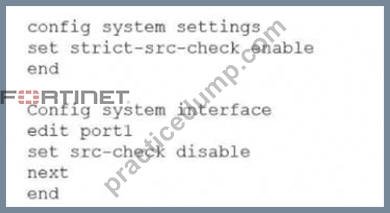
What would be the impact of this configuration on FortiGate?
- A. The global configuration will take precedence and FortiGate will enable strict RPF on all interfaces.
- B. FortiGate will enable strict RPF on all its interfaces and porti will be enable for asymmetric routing.
- C. Port1 will be enabled with flexible RPF. and all other interfaces will be enabled for strict RPF
- D. FortiGate will enable strict RPF on all its interfaces and porti will be exempted from RPF checks.
Answer: D
NEW QUESTION # 65
Refer to the exhibit. Which two statements are true about the routing entries in this database table? (Choose two.)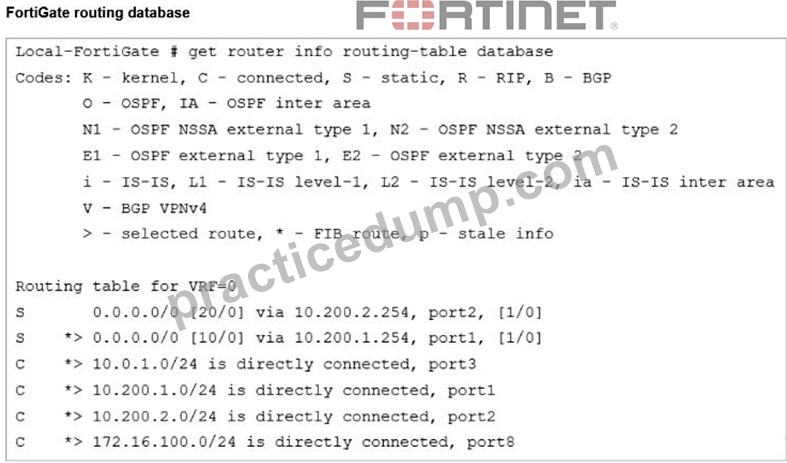
- A. Both default routes have different administrative distances.
- B. The port2 interface is marked as inactive.
- C. All of the entries in the routing database table are installed in the FortiGate routing table.
- D. The default route on port2 is marked as the standby route.
Answer: A,D
Explanation:
The default route via port2 has the same prefix as the route via port1 but a higher administrative distance [20/0]vs[10/0] and is not marked with ">" or "*". This indicates it is kept as a standby/backup route, to be used only if the better route via port1 fails.
The two static default routes clearly show different administrative distances in the brackets: [20/0] for port2 and [10/0] for port1, confirming that their administrative distances are different.
NEW QUESTION # 66
Refer to the exhibit to view the firewall policy.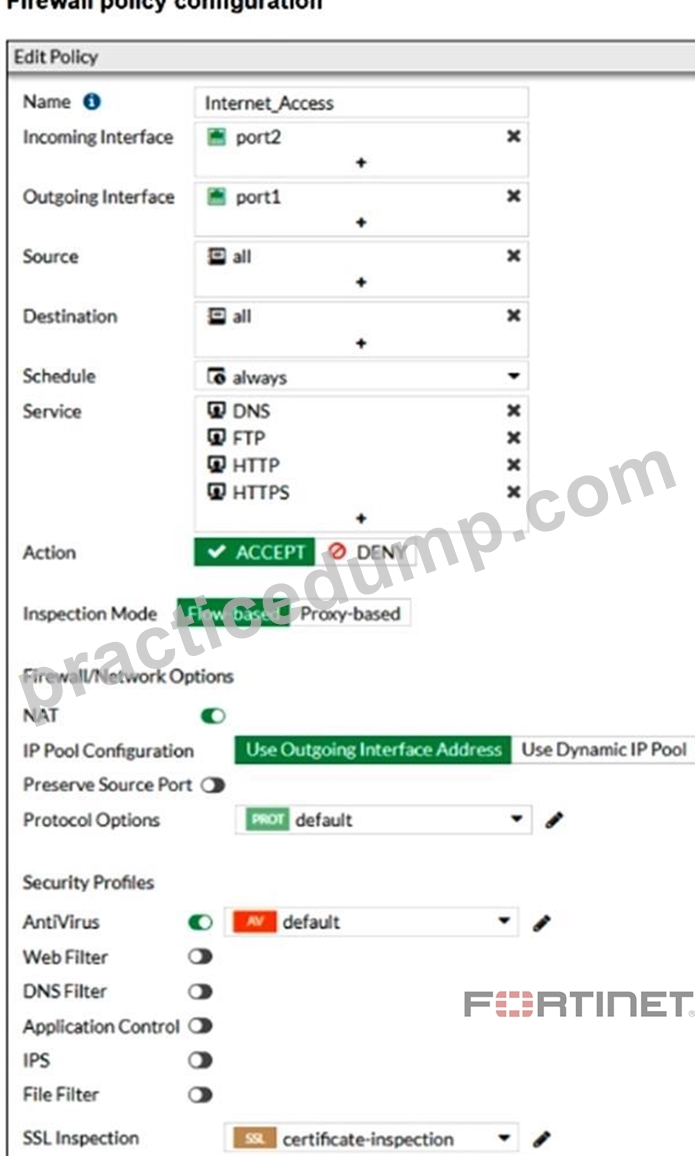
Why would the firewall policy not block a well-known virus, for example eicar?
- A. The firewall policy does not apply deep content inspection.
- B. Web filter is not enabled on the firewall policy to complement the antivirus profile.
- C. The action on the firewall policy is not set to deny.
- D. The firewall policy is not configured in proxy-based inspection mode.
Answer: A
Explanation:
The firewall policy uses certificate-inspection under SSL inspection and flow-based inspection mode. Certificate inspection does not decrypt HTTPS traffic; it only checks the certificate fields.
Because of this, FortiGate cannot perform deep content inspection, which is required for antivirus to detect and block threats such as the EICAR test virus within encrypted HTTPS sessions.
NEW QUESTION # 67
You have created a web filter profile named restrict_media-profile with a daily category usage quota. When you are adding the profile to the firewall policy, the restrict_media-profile is not listed in the available web profile drop down.
What could be the reason?
- A. The web filter profile is already referenced in another firewall policy.
- B. The firewall policy is in no-inspection mode instead of deep-inspection.
- C. The inspection mode in the firewall policy is not matching with web filter profile feature set.
- D. The naming convention used in the web filter profile is restricting it in the firewall policy.
Answer: C
Explanation:
Web filter profiles with category usage quotas require the firewall policy to be in proxy-based (deep) inspection mode; if the inspection mode does not match this requirement, the profile will not appear in the drop-down list.
NEW QUESTION # 68
When configuring firewall policies which of the following is true regarding the policy ID? (Choose two.)
- A. It is mandatory to provide a policy ID while creating a firewall policy regardless of GUI or CLI.
- B. A policy ID cannot be modified once a policy is created.
- C. You can create a policy in CLI with policy ID 0
- D. A firewall policy ID identifies the order of policy execution in firewall policies.
Answer: B,C
NEW QUESTION # 69
Refer to the exhibit.
A RADIUS server configuration is shown.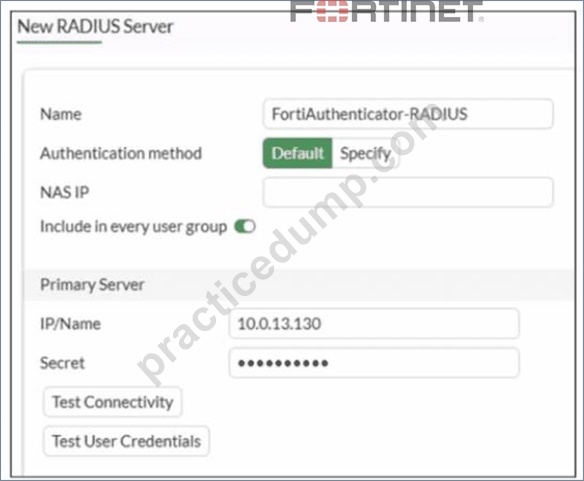
An administrator added a configuration for a new RADIUS server While configuring, the administrator enabled Include in every user group What is the impact of enabling Include in every user group in a RADIUS configuration?
- A. This option places the RADIUS server, and all users who can authenticate against that server, into every RADIUS group.
- B. This option places the RADIUS server, and all users who can authenticate against that server, into every FortiGate user group.
- C. This option places all users into every RADIUS user group, including groups that are used for the LDAP server on FortiGate.
- D. This option places all FortiGate users and groups required to authenticate into the RADIUS server, which, in this case, is FortiAuthenticator.
Answer: B
Explanation:
Based on the FortiOS 7.6 Authentication and User Group documentation, the correct answer is A.
Meaning of "Include in every user group" (FortiOS 7.6)
When configuring a RADIUS server on FortiGate, enabling Include in every user group has a very specific and documented effect:
The configured RADIUS server object is automatically added to all FortiGate user groups.
As a result, any user who successfully authenticates against that RADIUS server becomes a valid member of every FortiGate user group, unless additional group filtering (such as RADIUS attributes) is applied.
This simplifies configuration when the same external authentication source must be accepted across multiple firewall policies that reference different user groups.
This behavior is explicitly described in the FortiOS 7.6 Administrator Guide under RADIUS authentication servers and user groups.
Why Option A is Correct
FortiGate user groups can include:
Local users
LDAP servers
RADIUS servers
Enabling Include in every user group causes FortiGate to:
Insert the RADIUS server into all existing and future FortiGate user groups Therefore, all users authenticating via this RADIUS server are implicitly allowed in every FortiGate user group.
This is exactly what option A describes.
Why the Other Options Are Incorrect
B: FortiGate does not push users or groups into the RADIUS server. Authentication is always initiated by FortiGate toward RADIUS.
C: FortiGate does not manage or modify RADIUS-side group definitions.
D: LDAP and RADIUS user groups are separate authentication mechanisms; this setting does not merge or affect LDAP groups.
NEW QUESTION # 70
What are three key routing principles in SD-WAN? (Choose three.)
- A. By default. SD-WAN rules are skipped if only one route to the destination is available.
- B. By default. SD-WAN rules are skipped if the best route to the destination is not an SD-WAN member.
- C. By default. SD-WAN rules are skipped if the included SD-WAN members do not have a valid route to the destination.
- D. Regular policy routes have precedence over SD-WAN rules.
- E. SD-WAN rules have precedence over any other type of routes.
Answer: B,C,D
Explanation:
SD-WAN rules are matched only if the best route to the destination points to SD-WAN SD-WAN member is selected only if it has a route to the destination
https://docs.fortinet.com/document/fortigate/7.0.0/sd-wan-sd-branch-architecture-for- mssps/768108/sd-wan-routing-logic SDWAN rules are 'policy routes', but regular policy routes have precedence over SD-WAN rules.
https://community.fortinet.com/t5/FortiGate/Technical-Tip-Explaining-the-SD-WAN-rule-matching- process/ta-p/284325
NEW QUESTION # 71
Refer to the exhibit.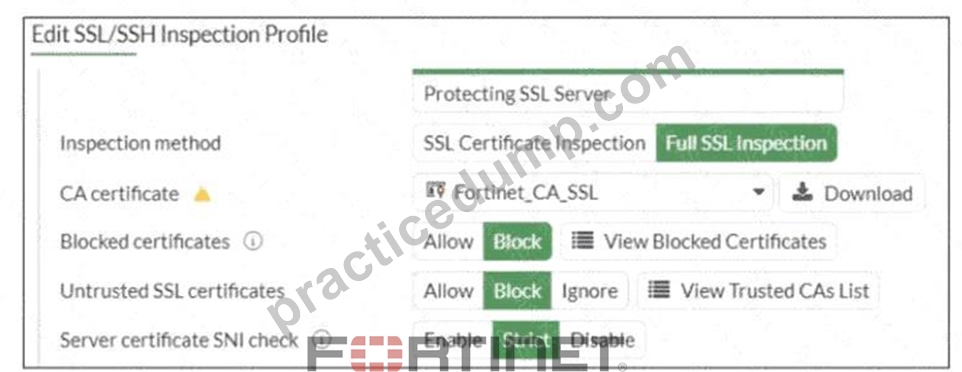
What would be the impact of these settings on the Server certificate SNI check configuration on FortiGate?
- A. FortiGate will close the connection if the SNI does not match the CN and SAN fields
- B. FortiGate will close the connection if the SNI does not match the CN or SAN fields.
- C. FortiGate will accept the connection with a warning if the SNI does not match the CN or SAN fields.
- D. FortiGate will accept and use the CN in the server certificate for URL filtering if the SNI does not match the CN or SAN fields.
Answer: B
Explanation:
Based on the exhibit and the FortiOS 7.6 SSL/SSH Inspection documentation, the correct answer is C.
Understanding the Exhibit Configuration
In the SSL/SSH Inspection Profile, the following settings are shown:
Inspection method: Full SSL Inspection
Server certificate SNI check: Strict
This setting directly controls how FortiGate validates the Server Name Indication (SNI) provided by the client during the TLS handshake.
FortiOS 7.6 Behavior of "Server certificate SNI check"
FortiOS supports three modes for Server certificate SNI check:
Disable
No validation between SNI and server certificate.
Enable
FortiGate checks SNI against the certificate.
If mismatch occurs, FortiGate may still allow the session with reduced validation.
Strict
FortiGate enforces a strict match.
The SNI must match either the CN (Common Name) or one of the SAN (Subject Alternative Name) entries in the server certificate.
If the SNI does not match either CN or SAN, the TLS session is immediately terminated.
The exhibit clearly shows Strict selected.
Why Option C is Correct
With Strict enabled, FortiGate rejects the TLS connection when:
The SNI does not match the CN, and
The SNI does not match any SAN entry
This results in the connection being closed, not allowed with warnings or fallback behavior.
Therefore:
C). FortiGate will close the connection if the SNI does not match the CN or SAN fields is exactly the documented behavior.
Why the Other Options Are Incorrect
A: FortiGate does not fall back to using the CN for URL filtering when Strict is enabled.
B: There is no "accept with warning" behavior in Strict mode.
D: Incorrect logical condition. FortiGate does not require mismatch with both CN and SAN simultaneously; a mismatch with either valid field set is sufficient to close the connection.
NEW QUESTION # 72
Refer to the exhibit. As an administrator you have created an IPS profile, but it is not performing as expected. While testing you got the output as shown in the exhibit.
What could be the possible reason of the diagnose output shown in the exhibit?
- A. FortiGate entered into IPS fail open state.
- B. Administrator entered the command diagnose test application ipsmonitor 99.
- C. There is a no firewall policy configured with an IPS security profile.
- D. Administrator entered the command diagnose test application ipsmonitor 5.
Answer: C
Explanation:
The output shows the IPS engine count as 0, indicating no active IPS engines are running. This typically means no firewall policy is referencing the IPS security profile, so the IPS profile is not being applied or triggered.
NEW QUESTION # 73
......
Get The Important Preparation Guide With NSE4_FGT_AD-7.6 Dumps: https://www.practicedump.com/NSE4_FGT_AD-7.6_actualtests.html
Get Totally Free Updates on NSE4_FGT_AD-7.6 Dumps PDF Questions: https://drive.google.com/open?id=1a7pUaXvKm3xrdbwbU_yFUfToVIyx2miP